
×

Personal Savings Planner

(5.0)
Retail price
Processing Time: 1-3 business days
Shipping & Handling*:
Quantity:
In Stock
View Cart
Product Details
Marketing
Shipping & Payment
Refunds & Returns
Need Help?
Product Details
CAREER & FINANCES • HTML PLANNER

The Money You Didn’t Spend Counts Too

A savings planner built around one goal. It turns your target, your income and your real spending into a monthly pace, then fills the circle every time you put money aside, skip a purchase or round something up.

 
🔥 Not spending counts as saving

A single interactive HTML planner that treats a skipped purchase as money saved. Log what you spent, what you set aside and what you talked yourself out of — the circle fills either way, and the pace tells you whether the goal is honest.

Made for anyone who has put the thing back on the shelf and had absolutely nothing to show for it.

🔓 Get Instant Access

✓ Instant access to the HTML planner

✓ Built to fill in, not just to read

✓ Works on any device, lifetime access

 
SOUND FAMILIAR?

Saving isn’t the hard part. Seeing that you did is

The goal is a number with no pace behind it

“Five thousand by summer” stays a wish until something works out what that actually means each month.

Budgeting apps want your bank and your patience

Connect the accounts, sort the history, and a week later you have quietly stopped opening the thing.

The wins that show up nowhere

You walk away from something you nearly bought, and not one number anywhere records that you did it.

The leak is invisible right up until it isn’t

No single purchase looks like the problem, and one category quietly eats the month regardless.

 
SEE IT BEFORE YOU BUY

What opens when you download

Not a budgeting app that wants your bank login — a single file you type into, in your browser.
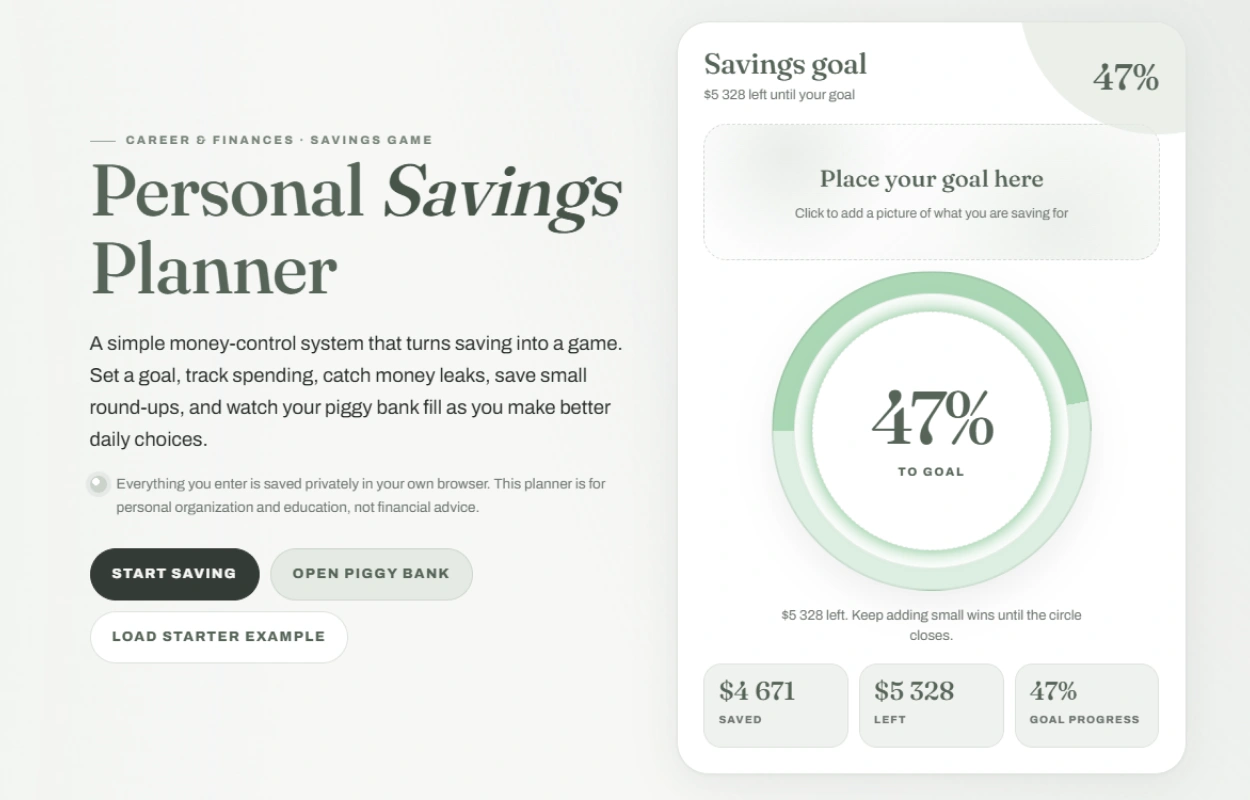
Opening screen of the savings planner showing a goal ring with the amount saved and the amount left

One goal, one circle, one honest percentage. The target, what you have put aside and what is still missing — with a space for a picture of the thing you are actually saving for.
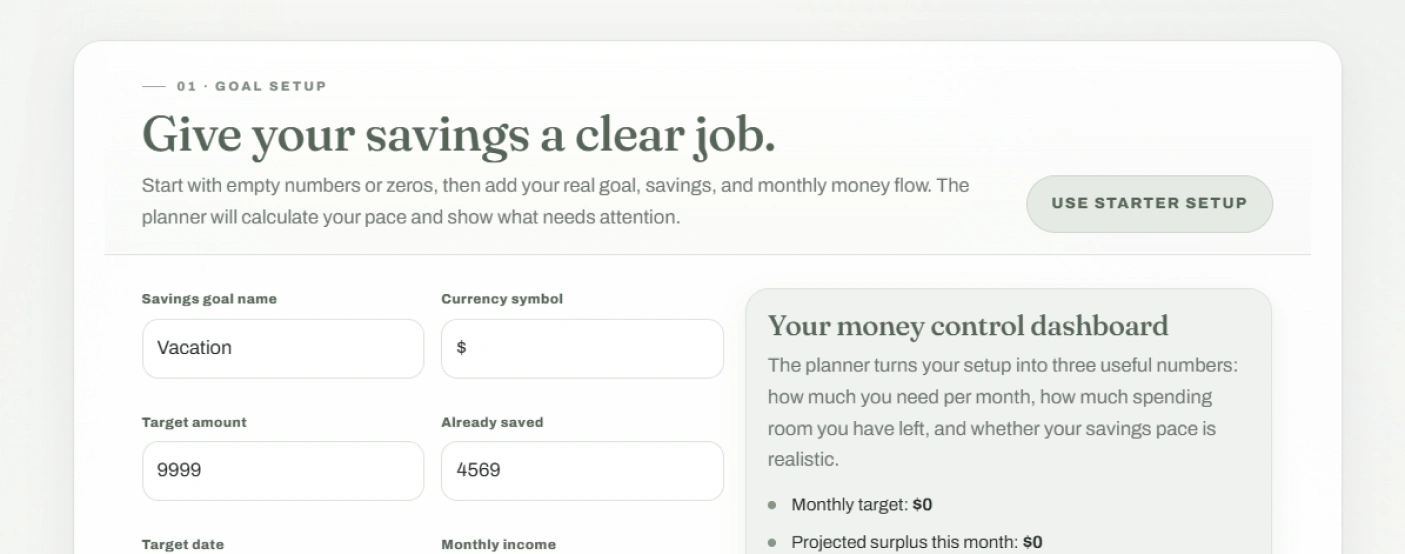
 
The goal setup step with fields for the target, current savings and monthly money flow

It starts by asking what the money is for. A target, a date and the shape of your month. From those it works out what you need to put aside monthly, how much spending room is left, and whether the pace is realistic.

 
7 sections to work through 8 spending categories 4 ways money moves 100% stays on your device
 
WHAT'S INSIDE

What it puts in your hands

Six things that make saving visible rather than something you only find out about later.

01

A goal that knows its own pace


What it costs a month, and whether that figure is honest about your income.

 
02

The wins that normally vanish


Walking away from a purchase counts here, in actual money, on the actual circle.

 
03

One line per entry and nothing more


No account to connect, no history to sort, no evening lost to categorising.

 
04

Where the flexible money actually goes


The category quietly taking a bigger share of the month than you would guess.

 
05

A week-long habit with a price on it


One small behaviour, worth a set amount every day you manage to keep it.

 
06

A page you can print and keep


Where the goal stands, what is left, and the one thing worth doing next month.

 
ONE SITTING

Ten minutes in, and the goal has a monthly price

It isn’t something you read. You sit down with a target and a rough idea of your month, and come out knowing exactly what the goal costs you every month between now and then.

01

Open it

One file in your browser. No install, no login, no bank account to connect before you can start.

02

Say what the money is for

A target, a date, and the honest shape of your month. Everything after this is measured against those.

03

Log things as they happen

A purchase, a transfer, or something you decided against — one line each, and the circle moves immediately.

04

Watch it fill from what you didn’t buy

Skipped purchases, round-ups and kept habits all land in the same place as real deposits, because they are the same money.

05

Print the snapshot at month end

Where the goal stands, what is left, and which category to keep an eye on for the next few weeks.

The point isn’t tracking every penny. It’s that the small refusals finally add up to something you can see.


Stop hoping it adds up. Start watching it

A goal with a monthly number attached behaves completely differently from a goal with a wish attached. Instant download, lifetime access, opens in any browser.

🔓 Get Instant Access
 

A personal organisation tool only. It works with figures you enter yourself and is not financial, investment, tax or debt advice.


At a glance

Format Interactive HTML planner (single file) Access Instant download after checkout
Compatibility Phone, tablet, laptop — any device Structure Seven sections, one goal at a time
Currency Whichever symbol you use Output A printable savings snapshot
Saving Everything stays in your own browser Price $PRICE
 
HERE'S EVERYTHING YOU GET

Everything inside — yours for $PRICE

The full seven-section planner

Goal setup, the piggy bank, the spending tracker, a weekly challenge, the money map, the plan and a printable review

Included

A piggy bank fed four ways

Deposits, skipped purchases, round-ups on your own spending, and days you kept the week’s habit

Included

Eight spending categories and a leak detector

Grouped so the one taking the largest share of your flexible money is named rather than guessed at

Included

A monthly plan that argues back

What you need each month, what you have spare, and the safe amount to move without breaking the rest of it

Included

A printable savings snapshot

The goal, the progress, the milestones reached, the leak to watch and the best next move, on one page

Included

Instant download, private and offline

Available the moment your payment clears, and everything you type stays in your own browser

Included
Regular price
Your price today
SAVE OFF
$PRICE
 
Download now
 
BEFORE YOU BUY

Questions, answered

How do I get it after paying? +

It's an instant download — the file is available the moment your payment clears, straight from your order confirmation. Nothing ships and there's no email delay.

What devices can I use it on? +

Any device with a browser — phone, tablet or laptop. You open the downloaded file the same way you'd open a web page, and the layout adapts to the screen size.

What's the refund policy? +

Refunds are handled under our store's Refund Policy (30 days), which covers the details for digital access.

Does it connect to my bank? +

No, and that's the point. Nothing is linked, imported or synced — you type entries in as one line each, which takes seconds and means no account credentials leave your hands.

Is this financial advice? +

No. It's an organisation tool that does arithmetic on figures you enter yourself. It has no opinion about debt, investing or what you should do with your money, and it isn't a substitute for advice from someone qualified to give it.

What actually counts as a saving? +

Four things: money you move across, a purchase you decided against, a round-up on something you did buy, and a day you kept the week's habit. They all land on the same circle, because they're all money you still have.

Can I use my own currency? +

Yes — you set the symbol yourself and every figure follows it. There's no conversion and no assumption about where you are.

Can I track more than one goal at once? +

It's built around a single goal at a time, which is deliberate — one target with a monthly number attached beats three competing ones. When you finish, you clear it and start the next.

Where does my information go? +

Into your own browser and nowhere else. Nothing is uploaded, so use the same device and browser each time, and print the snapshot if you want a copy that outlives your browser data.

Marketing

Use our battle tested marketing materials for Personal Savings Planner
in your marketing campaigns and start selling right away!

Shipping & Payment

Shipping

We are proud to offer international shipping services that currently operate in over 200 countries and islands world wide. Nothing means more to us than bringing our customers great value and service. We will continue to grow to meet the needs of all our customers, delivering a service beyond all expectation anywhere in the world.

Do you ship worldwide?

Yes. We provide free shipping to over 200 countries around the world. However, there are some locations we are unable to ship to. If you happen to be located in one of those countries we will contact you.

What about customs?

We are not responsible for any custom fees once the items have shipped. By purchasing our products, you consent that one or more packages may be shipped to you and may get custom fees when they arrive to your country.

How long does shipping take?

Shipping time varies by location. These are our estimates:

Location *Estimated Shipping Time
United States 5-20 Business days
Canada, Europe 5-20 Business days
Australia, New Zealand 5-20 Business days
Central & South America 5-20 Business days
Asia 5-20 Business days
Africa 5-20 Business days
*This doesn’t include our 1-3 day processing time.

Do you provide tracking information?

Yes, you will receive an email once your order ships that contains your tracking information. If you haven’t received tracking info within 5 days, please contact us.

My tracking says “no information available at the moment”.

For some shipping companies, it takes 2-5 business days for the tracking information to update on the system. If your order was placed more than 5 business days ago and there is still no information on your tracking number, please contact us.

Will my items be sent in one package?

For logistical reasons, items in the same purchase will sometimes be sent in separate packages, even if you've specified combined shipping.

If you have any other questions, please contact us and we will do our best to help you out.

Returns

Order cancellation

All orders can be cancelled until they are shipped. If your order has been paid and you need to make a change or cancel an order, you must contact us within 12 hours. Once the packaging and shipping process has started, it can no longer be cancelled.

Refunds

Your satisfaction is our #1 priority. Therefore, you can request a refund or reshipment for ordered products if:

  • If you did not receive the product within the guaranteed time (45 days not including 1-3 day processing) you can request a refund or a reshipment.
  • If you received the wrong item you can request a refund or a reshipment.
  • If you do not want the product you’ve received you may request a refund but you must return the item at your expense and the item must be unused.

We do not issue the refund if:

  • Your order did not arrive due to factors within your control (i.e. providing the wrong shipping address)
  • Your order did not arrive due to exceptional circumstances outside of our control (i.e. not cleared by customs, delayed by a natural disaster).
  • Other exceptional circumstances outside of our control.

*You can submit refund requests within 15 days after the guaranteed period for delivery (45 days) has expired. You can do it by sending a message at support@sellvia.com

Exchanges

If for any reason you would like to exchange your product, perhaps for a different size in clothing, you must contact us first and we will guide you through the steps.

Please do not send your purchase back to us unless we authorise you to do so.

Refunds & Returns

Refunds, returns, and exchanges

In the event that your order arrives damaged in any way, please email us as soon as possible at support@sellvia.com with your order number and a photo of the item’s condition. We address these on a case-by-case basis but will try our best to work towards a satisfactory solution.

Need Help

Can't find the desired product, or have any questions?

Reviews

Our reviews are verified for authenticity
Load More

Any questions about ecommerce?

We’ll be happy to answer in detail!
CONTACT US
Top
Account

Shopping cart

×