
×

Smart Grocery Shopping Organizer

(5.0)
Retail price
Processing Time: 1-3 business days
Shipping & Handling*:
Quantity:
In Stock
View Cart
Product Details
Marketing
Shipping & Payment
Refunds & Returns
Need Help?
Product Details
FOOD & COOKING • HTML ORGANIZER

A List Built Around the Food You Actually Eat

Not a blank list you fill in every week. Say what you eat once, mark what’s running low at home, and the list writes itself — grouped by aisle, filtered for what you can’t eat, and led by whatever is about to go off in the fridge.

 
🔥 Set it up once · then just shop

A single interactive HTML file that turns four states — in stock, running low, use soon, out — into a finished grocery list. Recipes are matched to what you actually keep and eat, the list is grouped the way the shop is laid out, and finishing the trip updates the kitchen for next time.

Made for anyone who has stood in an aisle trying to remember whether there’s still rice at home.

🔓 Get Instant Access

✓ Instant access to the HTML builder

✓ Built to use, not just read

✓ Works on any device, lifetime access

 
SOUND FAMILIAR?

You already know what you eat. The list never does

You buy what you already have

And come home to a third jar of the same thing, while the one item you actually needed is still on the shelf at the shop.

Meal planning collapses by Wednesday

A rigid week of dinners assumes a week that goes to plan, and almost none of them do.

Food goes off before it gets used

The vegetables bought with good intentions sit behind the leftovers until the decision makes itself.

Every list starts from nothing

The same twenty items, written out again by hand, in whatever order they occur to you rather than the order you’ll walk past them.

 
SEE IT BEFORE YOU BUY

What opens when you download

Not a notes-app list you rewrite every week — a workspace that remembers your kitchen, in a single file that runs in your browser and stays there.

Opening screen of the smart grocery shopping organizer

Set it up once, then resume. Your food preferences, what’s already at home and the list itself live in one place — with no account, no connection and nothing leaving the browser.
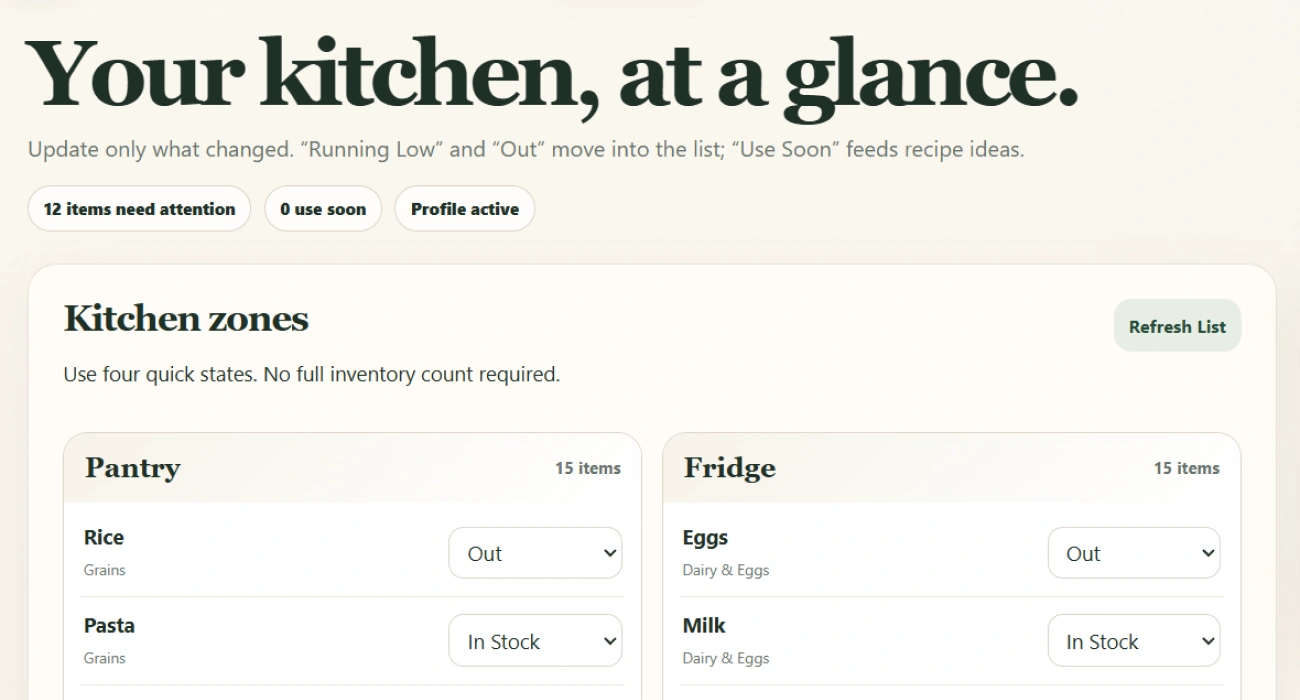
 
The kitchen workspace showing zones, item states and the Use First panel

Four states, and the list reacts. Mark something out or running low and it moves into the list; mark it use soon and it starts showing up in your recipe ideas instead.

 
36 foods already listed 10 recipes matched to you 8 allergens filtered out 100% stays in your browser
 
WHAT'S INSIDE

Inside the organizer

Six things it settles for you — so the shop stops being a memory test. It fits one person cooking twice a week or a household of five.

01

A list that writes itself


From what’s low at home and what you decided to cook — not from memory.

 
02

It never suggests what you can’t eat


Set the diet and the allergies once, and everything downstream respects them.

 
03

Recipes built around what’s already there


Especially the things about to go off, which is where most waste starts.

 
04

Grouped the way the shop is


So one trip is one pass through the aisles instead of three.

 
05

Prices only if you want them


Set a range where it matters and see roughly where the trip is landing.

 
06

Finishing the trip updates the kitchen


What you bought, what you swapped and what wasn’t there all carry into next week.

 
ONE SETUP, EVERY WEEK AFTER

Ten minutes at home, then a shop that goes quickly

The point isn’t to plan every meal of the week. It’s to walk in knowing what to buy, and walk out without the third jar of the same thing.

01

Open it

One file in your browser. It runs offline, and nothing you enter leaves your device.

02

Say what you eat, once

Diet, allergies, the cuisines you actually cook and how long you’re willing to stand at the hob. You won’t answer this again.

03

Walk the kitchen in two minutes

You’re not counting anything — just marking what’s low, out, or needs using this week.

04

Pick a few things to cook

Only the ones you might genuinely make. Their missing ingredients join the list on their own.

05

Shop from it, then close the trip

Tick things off aisle by aisle, note what you swapped, and the kitchen updates itself for next week.


Stop shopping from memory. Shop from a real list

Download it, set your food profile tonight, and let this week’s list build itself. Instant download, lifetime access, opens in any browser.

🔓 Get Instant Access
 

A planning tool only. It organises your own shopping and is not nutritional, dietary or food-safety advice.


At a glance

Format Interactive HTML organizer (single file) Access Instant download after checkout
Compatibility Phone, tablet, laptop — any device Workspaces Kitchen, recipes, list and shop mode
Setup Food profile once, then two minutes a week Prices Optional, in your own currency
Saving Autosaves in your own browser, works offline Price $PRICE
 
HERE'S EVERYTHING YOU GET

Everything inside — yours for $PRICE

Smart Grocery Shopping Organizer

The whole workspace: your food profile, the kitchen, recipe ideas, the grocery list and a shop mode for the trip itself

Included

A kitchen already stocked with staples

Three dozen everyday foods pre-sorted into zones and aisles, each with a substitute suggested — edit or add your own

Included

A recipe search builder

Combine an ingredient, a cuisine, a style and a time limit, and get back only what fits what you eat

Included

A Use First panel

The food that needs eating this week, with a real outcome for each — and it feeds straight into your recipe ideas

Included

A record of each trip

What you planned to spend, what you actually did, and what you bought — kept so the next list starts smarter

Included

Instant digital download

The file is available the moment your payment clears

Included
Regular price
Your price today
SAVE OFF
$PRICE
 
Download now
 
BEFORE YOU BUY

Questions, answered

How do I get it after paying? +

It's an instant download — the file is available the moment your payment clears, straight from your order confirmation. Nothing ships and there's no email delay.

What devices can I use it on? +

Any device with a browser — phone, tablet or laptop. You open the downloaded file the same way you'd open a web page, and the layout adapts to the screen size.

What's the refund policy? +

Refunds are handled under our store's Refund Policy (30 days), which covers the details for digital access.

Do I have to count everything in my kitchen? +

No, and it's built to avoid that. Each food sits in one of four states rather than carrying a quantity, so keeping it current takes a couple of minutes and a glance at the shelf.

Do I have to plan every meal for the week? +

No. You pick a few things you might genuinely cook, and only their missing ingredients join the list — which is why it survives the days the plan changes.

Does it handle allergies and diets? +

Yes, and it applies them everywhere rather than just warning you. Set them once and nothing you can't eat is suggested as a recipe or added to the list, with a substitute offered where there's an obvious one.

Does it know real prices? +

No — it has no connection to any shop. You can enter a price range for the items where it matters and see roughly where the trip is landing, or skip prices entirely and it still works.

What happens at the shop itself? +

There's a mode for the trip: your list grouped by aisle, one section at a time, with somewhere to record what you swapped or couldn't find. Finishing the trip writes all of that back into the kitchen.

Where does everything I enter go? +

It stays in the browser you opened the file in, and the whole thing runs offline. There's no account and nothing is uploaded anywhere.

Does it work for a household, not just one person? +

Yes. You set how many people you're shopping for, and the quantities it suggests follow from that.

Marketing

Use our battle tested marketing materials for Smart Grocery Shopping Organizer
in your marketing campaigns and start selling right away!

Shipping & Payment

Shipping

We are proud to offer international shipping services that currently operate in over 200 countries and islands world wide. Nothing means more to us than bringing our customers great value and service. We will continue to grow to meet the needs of all our customers, delivering a service beyond all expectation anywhere in the world.

Do you ship worldwide?

Yes. We provide free shipping to over 200 countries around the world. However, there are some locations we are unable to ship to. If you happen to be located in one of those countries we will contact you.

What about customs?

We are not responsible for any custom fees once the items have shipped. By purchasing our products, you consent that one or more packages may be shipped to you and may get custom fees when they arrive to your country.

How long does shipping take?

Shipping time varies by location. These are our estimates:

Location *Estimated Shipping Time
United States 5-20 Business days
Canada, Europe 5-20 Business days
Australia, New Zealand 5-20 Business days
Central & South America 5-20 Business days
Asia 5-20 Business days
Africa 5-20 Business days
*This doesn’t include our 1-3 day processing time.

Do you provide tracking information?

Yes, you will receive an email once your order ships that contains your tracking information. If you haven’t received tracking info within 5 days, please contact us.

My tracking says “no information available at the moment”.

For some shipping companies, it takes 2-5 business days for the tracking information to update on the system. If your order was placed more than 5 business days ago and there is still no information on your tracking number, please contact us.

Will my items be sent in one package?

For logistical reasons, items in the same purchase will sometimes be sent in separate packages, even if you've specified combined shipping.

If you have any other questions, please contact us and we will do our best to help you out.

Returns

Order cancellation

All orders can be cancelled until they are shipped. If your order has been paid and you need to make a change or cancel an order, you must contact us within 12 hours. Once the packaging and shipping process has started, it can no longer be cancelled.

Refunds

Your satisfaction is our #1 priority. Therefore, you can request a refund or reshipment for ordered products if:

  • If you did not receive the product within the guaranteed time (45 days not including 1-3 day processing) you can request a refund or a reshipment.
  • If you received the wrong item you can request a refund or a reshipment.
  • If you do not want the product you’ve received you may request a refund but you must return the item at your expense and the item must be unused.

We do not issue the refund if:

  • Your order did not arrive due to factors within your control (i.e. providing the wrong shipping address)
  • Your order did not arrive due to exceptional circumstances outside of our control (i.e. not cleared by customs, delayed by a natural disaster).
  • Other exceptional circumstances outside of our control.

*You can submit refund requests within 15 days after the guaranteed period for delivery (45 days) has expired. You can do it by sending a message at support@sellvia.com

Exchanges

If for any reason you would like to exchange your product, perhaps for a different size in clothing, you must contact us first and we will guide you through the steps.

Please do not send your purchase back to us unless we authorise you to do so.

Refunds & Returns

Refunds, returns, and exchanges

In the event that your order arrives damaged in any way, please email us as soon as possible at support@sellvia.com with your order number and a photo of the item’s condition. We address these on a case-by-case basis but will try our best to work towards a satisfactory solution.

Need Help

Can't find the desired product, or have any questions?

Reviews

Our reviews are verified for authenticity
Load More

Any questions about ecommerce?

We’ll be happy to answer in detail!
CONTACT US
Top
Account

Shopping cart

×